Album-derived backgrounds
Theater mode derives the playback background from the album art. Tracks without art use the theme default; transport glyphs sit directly over the background.
Better Vorbis decoding, faster track changes, natural sorting, Opus, playlists and a refreshed look for the DAP Neo. Pick an image, put it on the player from this page, and run the update on the device.
Standard CE runs on a physical DAP Neo. It booted, scanned a full card, played MP3 and Opus, showed embedded covers and the theater background, and passed the progress-bar and dial checks. Restoring stock firmware on that player also passed. That player was written over Rockchip USB (Rockusb); the copy-a-file update below follows the traced stock installer but has not yet been run with CE on hardware. Back up your music and read Going back to stock first. Format, USB-mode and endurance checks are still in progress.
If the player still boots and can run an update, install Back to stock the same way. It is stock code dated one day after CE, so the player prefers it. Plain stock DP3_V137.img is older than CE and the player would keep booting CE. If your player runs firmware newer than V137 (for example V155), this file cannot replace it; prepare a matching recovery first as described in release/FLASH_REVIEW.md. If the player does not boot, recovery uses Rockusb: hold Vol+, Vol− and OK while reconnecting USB, then write and fully read back both firmware slots. That procedure, measured on one player, is in release/FLASH_REVIEW.md; take a full backup of your own player before relying on it.
Connect the player to this computer with USB so its storage shows up as a drive.
sha256sum -c SHA256SUMS. Never install an image whose hash does not match.RKNANOFW.IMG, keeping the .IMG extension.RKNANOFW.IMG. A leftover update file can run the installer again..m3u playlist, the hold switch and a long press of Power.The stock installer writes both firmware slots, so no stock copy stays on the player after an install. Please report results, good or bad, as a GitHub issue with the image hash and what you tested.
DP3_V137.img; everything runs in this page and nothing is uploaded.These five colors reach the firmware only through the exact resource rules in section 3. The screens in section 2 show real firmware pixels, not this palette.
These four are set by code, not resources: the orange accent and the divider lines of each scheme. Tick one to change it. The build checks the instruction at both of its sites (the scheme routine and the clock painter) against stock and rewrites the colour in both.
The downloaded JSON is an input to patches/framework/build.py --theme-config theme.json, or to the builder in section 4 below. No flashing occurs here.
The screens in section 2 use real resource pixels and replay the player's own drawing of the status icon and transport row; the cover and text there are approximations, and the progress bar is drawn from the image's own column and knob resources at the player's coordinates. Black and 0x00F8 are blocked as possible transparency/key colors. Every resource patch pins its original RGB565 word and pixel count. The theme export on its own does not modify a binary; the builder in section 4 applies the same patches and finalisation as the Python framework, in this page and locally, and an offline test in the repository (tests/builder.test.mjs) checks its output byte for byte against the framework's.
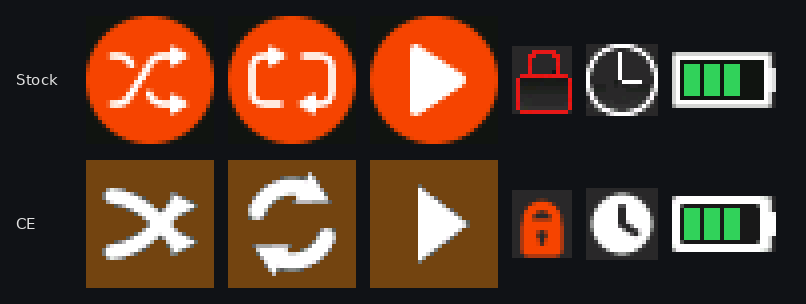
Real firmware pixels: every icon and background is decoded from the stock image and the CE standard image, and the status icon and transport row are drawn exactly as each image's player code draws them (recorded under emulation and checked word for word). On the CE side the cover's contrast and rounded corners, the format badge, the no-cover tile and the time line follow the CE artwork and time routines at their coordinates; text is set in Barlow SemiBold, the face CE's font was redrawn from, not the image's own glyphs. The stock cover and times, and both titles and artists, are drawn at approximate positions. The progress bar comes from the image's own resources on stock; on CE its colours follow the CE routine that inverts the background.
An overlaid resource is drawn at its stored x/y, with every pixel opaque.
Load the original firmware to examine its resource table. Select an asset, choose a source RGB565 color and assign a theme role. No global color search-and-replace.
Choose the firmware file to load the resource catalog.
No resource changes selected.
Everything below runs in this page, from the stock image in section 1: no scripts, no uploads. Every patch checks its expected bytes, every payload its pinned SHA-256, and the result gets the 2026-10-23 header date and a recomputed checksum. Built in emulation only; nothing has been tested on a device.
The CS43198 has five interpolation filters. Stock code can select each of them but no menu offers the choice, so every unit uses the first. Linear phase delays the signal about 0.9 ms at 44.1 kHz, against 0.14 ms for low latency. Slow roll-off starts falling at 18.4 kHz instead of 20 kHz and rejects 64 dB above the band instead of 110. NOS has almost no delay but is up to 3.2 dB down at 20 kHz and has no interpolation filter to remove images above the band. None of these is claimed to sound better.
Give any of the six presets your own curve: paste an AutoEQ GraphicEQ file for your headphones (from autoeq.app) or 31 dB values, and rename it if you like. Empty presets keep stock's curve and name.
The player's EQ is a 31-band graphic EQ (20 Hz to 20 kHz, ±12 dB in 1 dB steps), but stock presets use five bands, and Classical, Bass Boost and Heavy Metal apply Pop's curve, Jazz's curve and no EQ. Each curve is fitted to the firmware's own band filters; the build status reports the fit error and the peak boost, and a peak above 0 dB can clip. A name, up to 24 characters, replaces that item's label in the EQ menu in every language; leave it empty to keep the stock name.
Stock turns Bluetooth off after 5 minutes with nothing connected, and it stays off. Nothing changes while a device is connected; "never" keeps the module powered while unpaired (idle current not measured).
Loads a scheme into the editor above and turns on the theme option.
These features are not complete enough to build from this page. Hardware status overall: nothing has ever been flashed; every result so far is offline.
patches/full/README.md).The Standard image includes the firmware features below. Custom EQ is a build option; Minimal keeps the audio and library fixes without Opus. Device animations are illustrative previews, not hardware captures.
Theater mode derives the playback background from the album art. Tracks without art use the theme default; transport glyphs sit directly over the background.
Build option: fit an AutoEQ GraphicEQ file or 31 dB values to any of the six presets. The curve shown is an illustrative preview of the fitted HD 600 example, rather than an on-device EQ editor.
Hold Power to switch Bluetooth on or off. The preview highlights the side button during the hold and updates the screen status. Custom builds can also extend unpaired auto-off to 10 minutes or disable it.
Numbers sort by value, a leading “The” is ignored, and case and Latin-1 accents no longer split the list. Track 2 comes before Track 10.
Select an .m3u file in the browser to play its entries. Next, previous and shuffle remain inside the playlist, with up to 150 tracks from up to 32 folders. .m3u8 files work too.
With hold enabled, the lock screen shows the current track title and the elapsed and total playback time.
Icons, dialog cards, the low-battery and power-off screens, the CE splash mark and the progress bar have antialiased edges baked into their pixels, so curves, diagonals and text no longer step. Art on a solid ground blends exactly into it; art over album-derived backgrounds blends toward a neutral grey that stays clean on any cover, and the progress knob no longer sits in a dark square. List and menu text is still 1-bit, but its Latin glyphs are redrawn from Barlow SemiBold with 2-pixel stems and even spacing, which also fixes stock's overlapping L. Not yet viewed on the device.
When a track ends, the decoder stays loaded and running for the next file of the same format. The next track starts warm, without the three silenced buffers stock plays at every track start (about 78 ms for MP3, up to 279 ms for FLAC), and in emulation the system work before it starts falls from about 20.5 ms to 4.7 ms. Opening the next file still happens after the last one ends, so it is not sample-exact; hardware timing is unmeasured.
The Standard image replaces WMA support with Opus decoding. Choose Minimal if you need to keep WMA playback.
Two transient DAC errors no longer freeze volume until playback stops. Decoder clocks are lower and the wheel timer wakes 1,000 rather than 2,500 times per second; battery-life gains have not been measured.